Thứ Hai, tháng 4 09, 2018
Thứ Bảy, tháng 3 31, 2018
Amazon Niche Research Ultimate Guide – Find 100+ Niches Easily
Finding a great niche for your upcoming Amazon niche website is the most important step in your Amazon affiliate journey. If you do this right you’ll have a lot better chance of ranking your websites in Google and making some hefty commissions.
Niche research is fun when you know where to find some gold nuggets, it’s almost addictive. For every niche you find you must first make sure if it’s profitable and somewhat easy to rank with your SEO skills (or money you have to invest in paid SEO services).
Because I know a lot of you struggle with just finding niches at all, let alone validating them, I decided to make this guide to show you just how easy is to spot them, if you know where to look.
In my next article I will explain how to validate the niche and make sure it’s profitable and easy to rank, but today I am just going to show you where to search and find 100+ Amazon niche as fast as possible.
Where to find good Amazon niches

A lot of Amazon affiliates, including me, will say to you that niches are everywhere around us, and that’s absolutely true. However, that’s not really specific, and not all niches (products) around us are potentially good Amazon niches or easy to make money with.
You have to know what you are looking for and you have to make sure those niches are being searched on Google (1000+/mo search volume) and that they include buyer intent keywords in order to create successful Amazon niche site in the future.
For all that validation I use KWFinder to make sure the niche I’ve just found is good enough, but I’ll explain all that in my upcoming Amazon keyword research and validation article.
Now, let’s see where exactly are all those good niches hiding…
Automated niche research
This method is for the laziest future affiliates out there. You are just required to click and collect the data, that’s it.
Lucky for us all, there are some smart people who have built the tools to help us all find Amazon niche with literally just point and click of your mouse.
Let me introduce you with those amazing tools…
Niche Wolf
Niche Wolf is a niche idea generator where you just click on “Suggest niche” link and it generates niches in front of you in a matter of seconds.
Each niche shows search volume and difficulty (although not too specific, just High, Medium, Low) so that you can know instantly is the niche even worth pursuing or further investigating.

Niche Wolf has a free Basic plan which suggests you 25 niches per day, and a Pro plan where it suggests 250 niche ideas per day.
Best thing is, Pro plan costs just $25 for a lifetime access, it’s really a bargain, I suggest that you check it out.
AmzNicheFinder
This is one really amazing tool. AmzNicheFinder, just like Niche Wolf above, helps you find a good niche for you upcoming Azon niche site, but, it does things a little differently.
I suspect that this tool was initially made to help future Amazon sellers find a good niche to get into by researching products and sales, but no one is stopping us to use it for Amazon affiliate niche researching.
So this is how AmzNicheFinder works…
You are presented with a total of 20 main Amazon categories in the left sidebar, and your step is to click on any of the given categories.
When you click on a category you will get a list of subcategories within that main category showing you all sorts of useful info, like Best seller rank, Average estimated sales per month, Number of products within give sub-category, Average product price, Average number of product reviews, Average product rating and more!

This is awesome because you can quickly discover some important factors about that specific subcategory, see how many products are there, what’s the average price and how many sales is the niche getting, which is all really important to understand if the niche has potential or not.
AmzNicheFinder is free to use with limited results, and if you want more it’s just $19/mo to discover over 20 thousand possible niches with just a few clicks.
AmaSuite
And here’s a product I’m sure many of you have heard about. AmaSuite is a complete set of tools for both Amazon affiliates and sellers. Not only that, there’s even Amazon affiliate training course included in the package. I won’t even start mentioning all the other bonuses, WordPress plugins and other tools you get, it’s really one complete Amazon affiliate product package.
For Amazon niche research I like to use two products from AmaSuite, called Azon Top 100 Analyzer and Azon Keyword Generator.
It’s really easy to get a ton, like literally hundreds of niche ideas with these two tools. Let me explain to you quickly how exactly to accomplish that.
Note that I haven’t spent too much time with Amasuite products since I just got it, but within 5 minutes of using it I am already seeing how powerful it is. You can expect a full AmaSuite review in the near future.
Azon Top 100 Analyzer
So, first tool is Azon Top 100 Analyzer. This is how I use it to get hundreds of niche ideas.
I select Amazon website (.com or .co.uk, but usually I go with .com), and a data source (which can be Best sellers, Hot new releases, Movers and shakers, Most wished for and Most gifted – I usually go with Best sellers).
After that you only need to select Amazon category and subcategory. And here’s the trick I use… Since you don’t know which sub-category is the best (and there’s so many of them), just choose the main category (about 30 of them in total) and click the green arrow button to start working.
What this will do is show you top 100 products in that category, the product price, commission you get, average rating etc. For this example I chose Kitchen category and it listed 100 products of which many I’ve heard for the first time and would never remember to look at. All that within 1 minute and a few clicks. Neat ha? 
Azon Keyword Generator

This tool is really fun. All you need to do is type in your seed keyword and run the tool to get hundreds or even thousands of keywords.
How will this help you find your Amazon niche you ask? Simple, you just input one of the main Amazon categories or subcategories and watch the keywords appear in front of your eyes.
Again I tried with “kitchen” as my seed keyword and got over 300 keywords. You can then export those keywords in a .csv file, and put some buyer intent words in front of it like “best”, and import those keywords in keyword research tools like KWFinder to see how they perform on Google. 
And that’s it. Make sure to check AmaSuite, it’s a paid product but you really get a ton of value, and they have several payment plans for those of you on a budget.
“Stealing” Amazon niches from marketplaces
If clicking on niche idea generators is still too hard for you, let me make it even simpler.
With this method you can easily find 50-100 amazing Amazon niches within the next hour or so, it’s that good as you’ll see in a minute.
Method 1 – Flippa
The first method involves a website called Flippa. I got this idea from Lewis Ogden who wrote about it on Cloud Income and Matthew Woodward in a lot of details, but I’ll keep it short and simple for you.
Flippa is an online marketplace for websites and domains. People often sell their niche sites over there for a lot of money, and a lot of those websites are Amazon affiliate websites. In other words, if they are selling it or already sold it for thousands of dollars the niche they used must be really good, right? Right.
So, go over to Flippa.com -> Click on Websites -> Click on Advanced search from the top menu.
In Advanced Search window choose these parameters (skip all the rest not mentioned below):
- Listing format: All
- Property type: Website
- Auction status: Won listings
- Age: Between 12 months old and unlimited (leave blank)
- Revenue: $100 and unlimited (leave blank)
- Revenue sources: From affiliates

Click on Search Listings and enjoy. 
Now all you need to do is check the names of the websites (website domain) and recognize Amazon niche sites. You’ll see them easily if there are words like “best” or “reviews” in it, and also if there’s some kind of product type (for example: kitchen faucets) mentioned in the URL.
All you need is time browsing through all the listings and you can easily find 50-100 great Amazon niches.
Method 2 – Pre-made niche website sellers
I hope Dom Wells won’t be made for mentioning his website, but since he made all of it so public it’s just too good not to be mentioned.
Dom Wells is a guy behind Human Proof Designs company where they sell complete niche websites. You just lay down the money and you get a complete website made for you. If you have money and don’t have the time to do it all on your own, I sincerely recommend Dom’s service, he is one of the best in the industry and a lot of people are recommending him.

Ok, so this method is really, really simple. All you need to do is go to All Sites page from Human Proof Designs and look for websites with word “Amazon” beneath the picture. That means that the website made is an Amazon affiliate website.
And every niche is clearly visible so you can check it out and start building your own website in that niche if you want. All you need to do is choose. 
P.S. For even more ideas check their keyword packs too.
Other methods
There’s also another website marketplace called Empire Flippers where you can use the same tactics. Although, over there they don’t reveal exact niches, but you can get at least a general niche idea (for example, you’ll see that website was in the fitness niche and they sell exercising equipment, but you’ll need to do some more research manually to find which products are the best.
Find Amazon niches on Amazon (duh)
Did you know that you can find great Amazon niches on…Amazon!
Yes, of course you knew that, but let me show you a few tricks on how to speed up your browsing through Amazon’s huge amount of categories and subcategories.
Basically on Amazon whatever product you pick is possibly a good niche. But it’s so many of them that you don’t know (me either) where to look and soon you’ll probably give up because of information overload.

Here are few Amazon pages that might help you find good niches:
- Best Sellers page (UK version) – Here you can easily see which products are best sellers in any given category. If it’s selling good means that people are buying, which means people are searching for it, which means there’s a good chance for you to make some money.
- Gift Finder page – This page will suggest best gifts for men, women, and children. Note that there are a lot of cheap products listed, but a little digging could help you find a good niche.
- Site Directory page – Don’t you just hate that Amazon’s clunky category sidebar? I sure do. Luckily this page shows you a lot of categories nicely listed.
- Hot New releases page – As the name says, on this page you can discover new products recently released on Amazon.
- Movers & Shakers page – On this page you can find the products with most sales over the past 24h (updated hourly).
- Most Wished For page – This page contains products that are most often added to wishlists by users.
- Most Gifted page – Most popular products ordered as gifts. Keep an eye on this page during Christmas time.
Everything is on Amazon, every niche you are looking to find on other sites is on Amazon already, you just have to find it. It takes time but it’s there. Hope these few links above will help you a bit.
You can also check category pages on a few other biggest online marketplaces in the world like eBay, AliExpress and AliBaba.
Other websites for niche ideas and research

If all these methods above are not enough let me give you a few more.
Below listed websites are the best ones I could find to allow fastest niche research possible.
As most of you know Reddit is one of the world’s most visited websites, completely managed and created by its users (content wise) who gather in subreddits to talk about their mutual passions or just to discuss about topics they love or like.
People who are passionate about something think more with their emotions than with their heads, that’s what makes them perfect buyers. Find a niche which customers are passionate about it and you’ve found yourself a goldmine.
On SnoopSnoo website you can check subreddits in user-friendly presented categories and subcategories. You just need to check them out more closely and I guarantee that you will find some good niches in there.
Craigslist
One of the largest classified ads websites in the world (or in the US at least), Craigslist will give you another ton of niche ideas.
What I like to do is check the “for sale” category and its subcategories. Just dive in and observe. People are selling so many things, it’s really hard not to spot interesting niches really quickly.
Consumer Reports
Now this is just beautiful… Consumer Reports is a website which reviews products, just like you will, but on a much larger scale.
Be sure that they don’t just review any products, they pick their products and niches carefully. So why wouldn’t you help yourself with some of their niches?
Just visit their product index and have fun 
Best Reviews
Best Reviews is another website, similar to Consumer Reports, where it’s stupidly easy to find some good Amazon niches.
Just visit their homepage, scroll a bit down and you’ll see their categories and products they’ve reviewed. Every single product is a potential Amazon niche website goldmine.
The Wire Cutter
This is another review-style website which is filled with niche ideas. Just visit The Wire Cutterwebsite and check the articles, you’ll instantly see dozens of niches, many of them actually really good.
SEMrush spy trick
Here’s a neat trick you can use to find best niches in some of the top review websites like Best Reviews or The Wire Cutter with SEMrush marketing tool.
You simply visit SEMrush, enter one of two websites mentioned above (or, add your own) and click the Search button. Now, in the left menu click on Organic Research and when that window loads you’ll be able to see search/filter and Advanced Filters options. Note that you need to be a paid SEMrush user to be able to access that.
When you access advanced filter options you can use one of these two settings:
- “include keywords that begin with ‘best’ “
- “include keywords that end with ‘reviews’ “
That way you will quickly find pages that are actively targeting product review terms.
Do It Yourself
This website is awesome, a great way to learn how to do something on your own. And also a great place to find some nice Amazon niches.
A lot of these DIY projects involve some kind of products, and you guessed it right, those products are your potential Amazon niches.
Check it out and spend few minutes going through categories, I promise you’ll find a lot of good niches.
The Chive
Those of you who know about The Chive are probably thinking whaaaat, how can you possibly find any niche in there? 
The Chive is a website with a lot of funny things and a lot of beautiful girls and women, mostly presenting their “articles” in image format.
But, between all that funny and sexy posts, there’s a category called Want vs Need where they publish articles (among others) called Shut Up And Take My Money. In those articles they share a lot of cool real life products and gadgets wich may give you some nice niche ideas.
Just don’t get distracted by all those beautiful girls :p
Don’t forget about this niche generator
You.
That’s right, you’re one of the best niche idea generators in the world.
For the first Azon niche site choose a niche that you have at least some passion and love for – if you can find such niche and validate it (make sure it’s profitable and possible to rank).
Think about and write about things you love, like, know about, do for fun and/or profit, things that interest you.
Take a look around you while you are in your apartment, what things do you see? What things do you have on your working table, in your living room, garage?
Watch people around you, what are they doing, what are they wearing, what tools are they using, what do they do for fun?
Think about other people’s hobbies and passion, you’ll be surprised how much money hobbyists will spend on their passion. They’ll drop hundreds or thousands of dollars without blinking because it gives them joy and makes them happy.
The same goes for people with some kind of problems. Find people’s pains and then find products that help people get rid of that pain or problem.
Think locally, what kind of things you can easily buy in your local store? For example, garden equipment, you probably won’t look for it online if you can get it nearby. But if you need to buy a fishing kayak where will you look? On Google, that’s right.
Wrapping it up
No more excuses guys. No more oh, I can’t find a niche, I don’t know how to do it, this is so hard and similar bullshit. I laid it all down for you, with these tips above you can literally find hundreds, if not thousands, of niches you can use to build your first or second or 100th Azon niche website.
I suggest that you keep a file, a Google Spreadsheet or something with all niches you find interesting or that might have a potential to become profitable.
In my next article I will show you how to validate a niche, make sure it’s a profitable Amazon niche with lots of search volume and easy to rank.
How or where do you find you Amazon niches? Share your experience in the comments.
Until next time, happy niche hunting 
About the Author Drazen Prastalo
Successful affiliate marketer, pro blogger and online entrepreneur. Loves to write, watch movies and build niche websites. On its way to conquer Amazon and build highly profitable Azon niche sites.
Công cụ nghiên cứu từ khoá tốt nhất cho SEO: Phiên bản 2018
Từ khoá là một trong những phần quan trọng và quan trọng nhất của SEO. Chúng tôi đã thảo luận chi tiết ở đây .
Nền tảng cơ bản của SEO là nghiên cứu từ khóa.
Sau đó, các yếu tố khác như tối ưu hóa trang , chất lượng nội dung , giao diện trang web tốt và một số yếu tố khác đi kèm với hình ảnh.
Nhiều công ty đầu tư hàng ngàn đô la để trả cho nghiên cứu từ khóa để có được nội dung được nhắm mục tiêu như vậy.
Nhưng bạn không cần phải làm điều đó. Chỉ cần làm theo hướng dẫn này ...
Các từ khoá bạn chọn tập trung vào nỗ lực tối ưu hóa công cụ tìm kiếm (SEO) là yếu tố quyếtđịnh đến sự thành công của xếp hạng trang web của bạn.
Chọn đúng từ khóa không phải lúc nào cũng dễ dàng hoặc trực quan và bạn cần nhiều dữ liệuđể biết liệu một từ khóa nào đó sẽ làm việc cho bạn hay không.
Nếu bạn hoàn toàn mới đối với các công cụ nghiên cứu từ khoá và quá trình nghiên cứu từ khóa, đây là một số hướng dẫn từ quá khứ sẽ giúp bạn hiểu các khái niệm cơ bản:
- Tầm quan trọng của Từ khoá trong SEO
- Nghiên cứu từ khoá cho người mới bắt đầu sử dụng Công cụ lập kế hoạch từ khóa của Google
Vì vậy, bây giờ bạn đã biết các khái niệm cơ bản về nghiên cứu từ khóa và bạn có hiểu biết về nó có giá trị như thế nào.
May mắn thay, có rất nhiều công cụ có sẵn có thể giúp bạn tìm ra những từ khóa làm việc tốt nhất cho chiến lược web tổng thể của bạn. Có hai loại công cụ nghiên cứu từ khoá chính:
- Nghiên cứu từ khoá cơ bản: Sử dụng hạt giống Từ khoá để tìm Từ khoá Có Lợi nhuận
- Nghiên cứu từ khoá dựa trên đối thủ cạnh tranh: Tìm các từ khóa đã được kiểm chứng đang giúp các trang web khác hướng lưu lượng truy cập.
Cá nhân, tôi thấy Nghiên cứu từ khoá dựa trên Thử nghiệm có hiệu quả hơn vì mục đích của nghiên cứu từ khoá là tìm Từ khoá có Lợi nhuận. Điều gì có thể có lợi hơn cái gì đó đã làm việc cho ai đó?
Tất cả bạn cần làm sau đó là tạo một trang nhắm mục tiêu từ khoá có lợi nhuận và gặt hái được lợi ích của việc nghiên cứu từ khóa.
Trong hướng dẫn độc quyền này, tôi đã đề cập cả loại Từ khoá. Hầu hết các công cụ nghiên cứu từ khoá này được trả tiền và chỉ một vài trong số đó là miễn phí.
Đây là danh sách các công cụ được liệt kê dưới đây:
- Người lập kế hoạch từ khóa của Google
- SEMRUSH (Đã đưa ra một liên kết dưới đây để thử SEMRUSH trị giá $ 199)
- Ahrefs (Đề nghị 7 ngày dùng thử với $ 7)
- LongTailPro
- KWFinder (Cũng có kế hoạch miễn phí)
- SpyFU
- WordTracker
- SERPStat
Công cụ nghiên cứu từ khoá tốt nhất: ấn bản năm 2018
1. Người lập kế hoạch từ khóa của Google

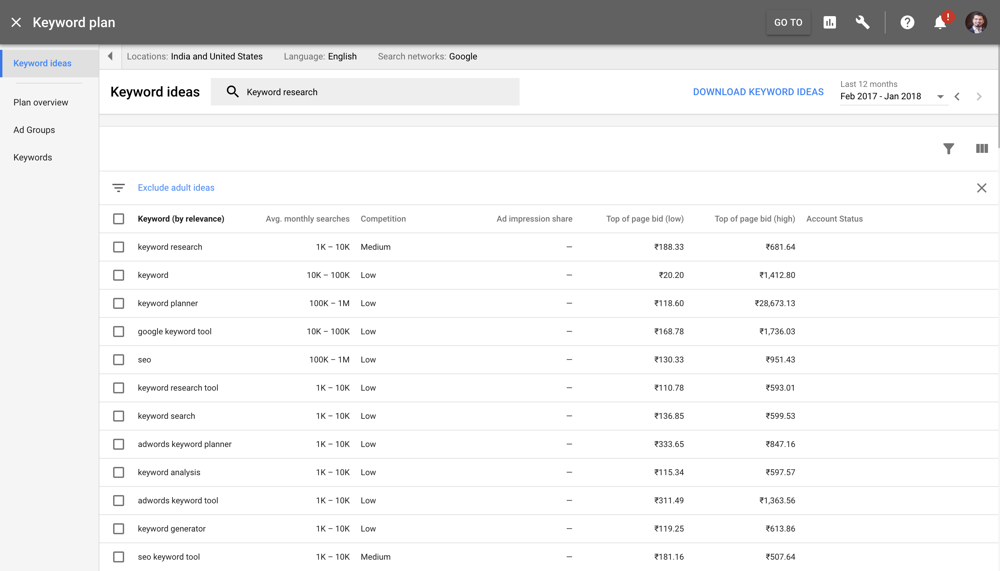
Công cụ Google Planner từ khoá là một trong những công cụ nghiên cứu từ khóa được sử dụng phổ biến nhất hiện nay.
Lý do duy nhất khiến nó trở nên phổ biến là miễn phí và được tích hợp trực tiếp với Google AdWords.
Để bắt đầu sử dụng công cụ này, bạn cần có tài khoản AdWords (bạn có thể tạo một tài khoản miễn phí).
- Tính năng: Tính năng lớn nhất của công cụ lập kế hoạch từ khóa là thông tin sâu sắc mà nó cung cấp trên Google (công cụ tìm kiếm lớn nhất).
- Hạn chế: Trong một số cách, đó cũng là một giới hạn. Nếu bạn muốn biết làm thế nào trang web của bạn hoặc một từ khóa nhất định đang làm trên các công cụ tìm kiếm khác, bạn sẽ không nhận được nó ở đây.
- Giá cả: Miễn phí sử dụng.
Công cụ Lập kế hoạch từ khóa là công cụ tốt, cơ bản cho giai đoạn đầu của SEO trên trang web.
Đây là công cụ miễn phí ưa thích của tôi, nhưng nếu bạn cần phân tích chi tiết hơn và cạnh tranh, tôi khuyên bạn nên sử dụng một trong những công cụ tiên tiến mà tôi đã liệt kê dưới đây.
Xem Trình lập kế hoạch từ khóa của Google AdWords ở đây
2. SEMRUSH

"Công cụ nghiên cứu từ khoá đơn giản nhất cho blogger là gì?"
Câu trả lời:
SEMRUSH
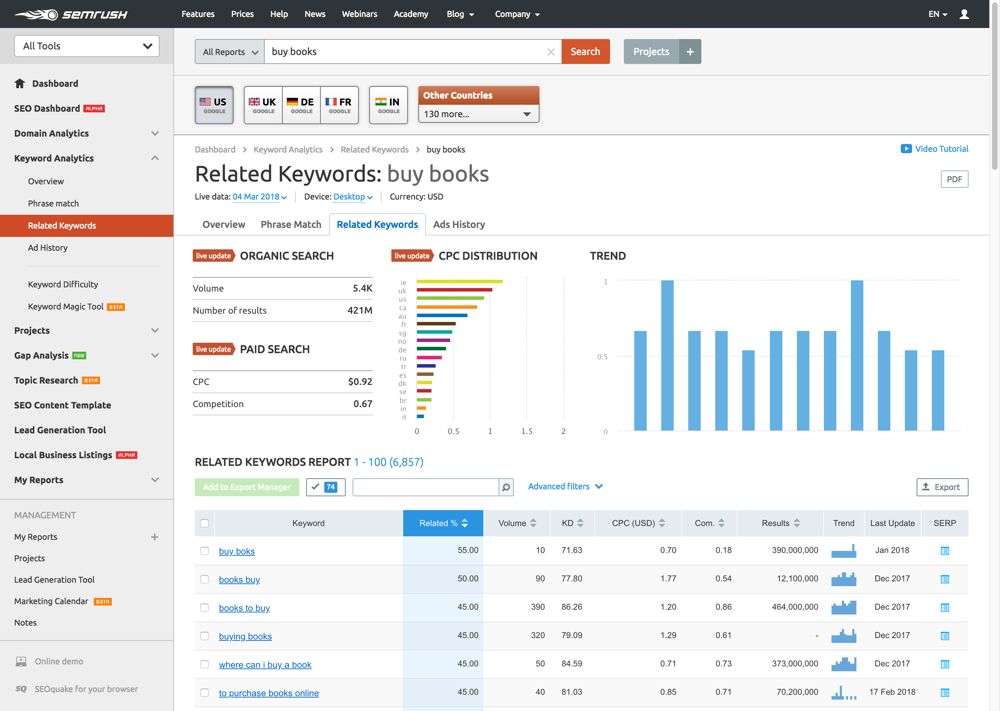
SEMRUSH không phải là một công cụ nghiên cứu từ điển điển hình ; nó cung cấp rất nhiều hơn là chỉ nghiên cứu các từ khóa.
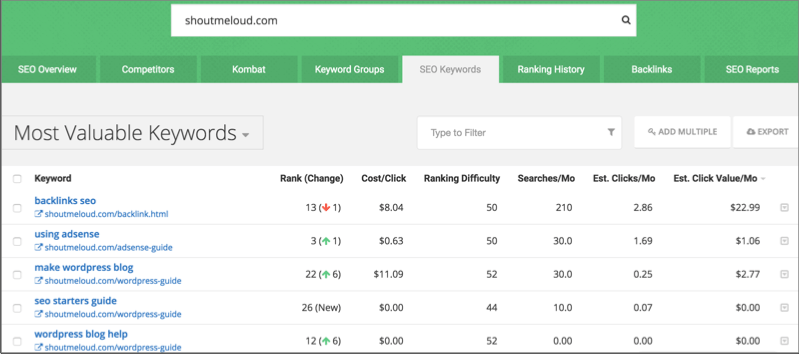
Không giống như các công cụ khác, nơi bạn cần thêm từ khóa hạt giống để bắt đầu nghiên cứu, ở đây bạn chỉ cần thêm URL của bạn (hoặc URL của đối thủ cạnh tranh) và nó sẽ hiển thị cho bạn tất cả các từ khoá xếp hạng cho trang đó.
Điều này làm cho bạn dễ dàng tìm thấy các từ khóa ngắn và đuôi dài mà bạn có thể nhắm mục tiêu và đánh bại đối thủ cạnh tranh của bạn.
Bạn có thể xem chi tiết về:
- Thống kê lưu lượng truy cập
- Báo cáo công cụ tìm kiếm
- CPC Adsense
- và rất nhiều chi tiết khác mà bạn cần trong quản lý đúng một chiến dịch SEO.
Đây là sản phẩm được đánh giá cao .
Bạn có thể đọc chi tiết xem SEMRUSH ở đây .
Tải xuống bản dùng thử SEMRUSH 14 ngày (hoàn toàn miễn phí) ở đây
3. Công cụ Tìm kiếm Từ khoá Ahrefs
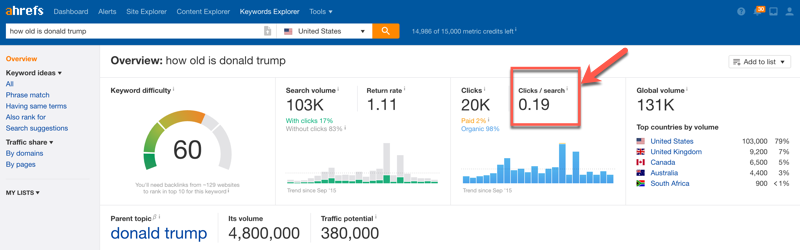
Ahrefs là một trong những công cụ từ khóa phổ biến nhất hiện có. Những gì tôi thực sự thích về họ là chi tiết bao gồm cả khó khăn từ khoá. Ahrefs sử dụng dữ liệu nhấp chuột để cho biết số lượng nhấp chuột bạn nhận được từ công cụ tìm kiếm. Điều này rất hữu ích sau khi tích hợp đồ thị tri thức, vì nhiều từ khóa có thể có lưu lượng truy cập lớn nhưng hầu như không nhận được bất kỳ nhấp chuột nào từ công cụ tìm kiếm. Lý do là họ nhận được câu trả lời trực tiếp từ kết quả tìm kiếm của Google. Ví dụ về một truy vấn như sau: "ngày sinh của bất kỳ người nổi tiếng nào"

Một điều khác làm cho công cụ nghiên cứu từ khoá của Ahrefs nổi bật là UI tuyệt vời và số lượng dữ liệu mà họ cung cấp. Bạn cũng có thể tạo một danh sách các từ khoá để nhắm mục tiêu trực tiếp từ bảng điều khiển Ahrefs. Bạn không cần phải sử dụng excel & đây là một tiết kiệm thời gian rất lớn.
Dành 7 ngày dùng thử Ahrefs với giá 7 đô la
4. LongTailPro <$ 30 Giảm giá>

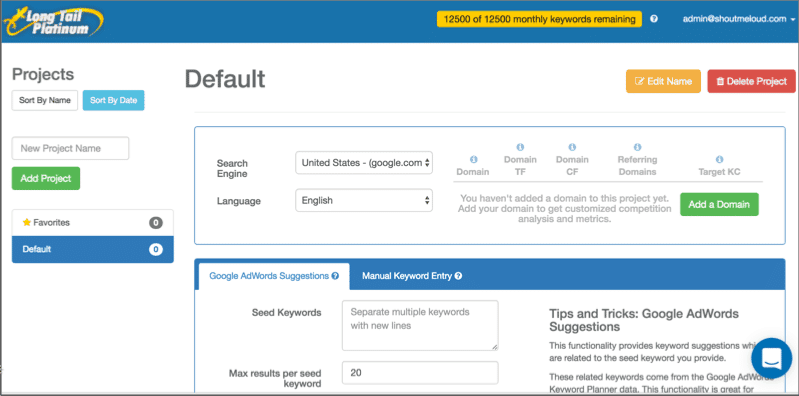
LongTailPro là một phần mềm dựa trên đám mây để nghiên cứu từ khóa và là một trong những phổ biến nhất trong danh sách này.
Đây là một công cụ nghiên cứu từ khóa được trả tiền sẽ giúp bạn tìm các từ khóa tuyệt vời cho các trang web thích hợp / micro-niche của bạn . Với phiên bản "bạch kim" của chúng, bạn có thể có được tính năng phân tích từ khoá tuyệt vời và thực sự chi tiết.
Họ cũng có một kiểm tra cạnh tranh, mà sẽ làm cho nó dễ dàng hơn cho bạn để chọn đúng từ khóa.
Bạn có thể xem xét chi tiết về LongTailPro ở đây .
Nhận $ 30 off của LongTailPro ở đây
5. KW finder:

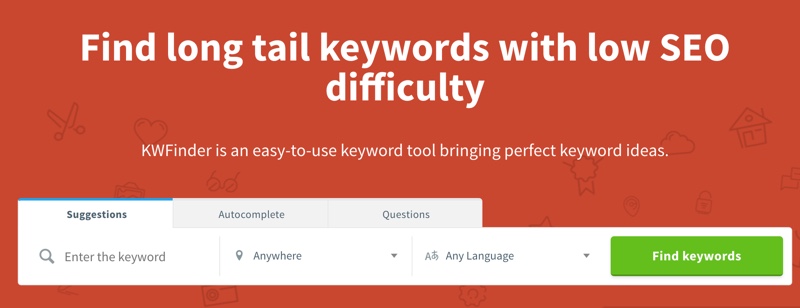
Nếu bạn đang tìm kiếm một công cụ hoàn toàn dành riêng cho nghiên cứu từ khoá, KWFinder là đặt cược tốt nhất của bạn. Họ là mới trên thị trường nhưng họ là một trong những công ty tăng trưởng nhanh nhất công cụ SEO.
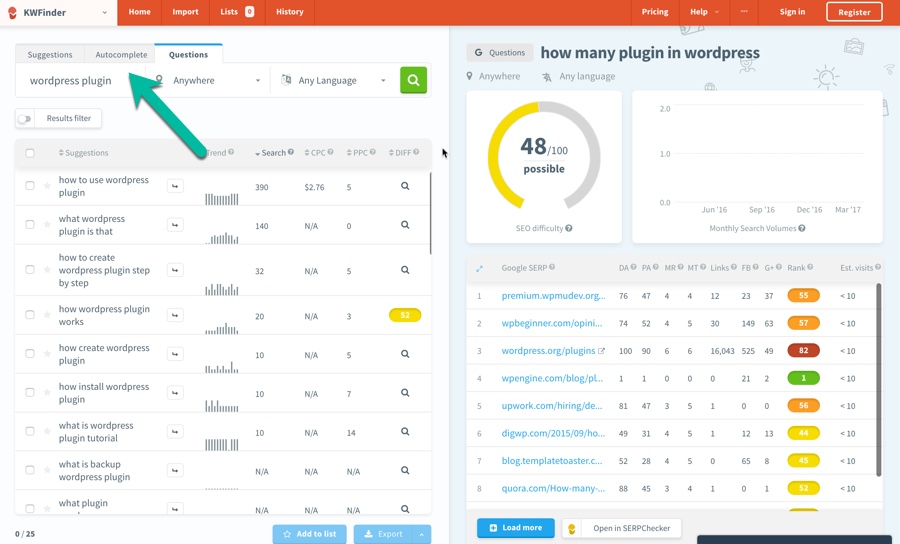
KWFinder giúp bạn có được Từ khoá sẽ giúp bạn lái xe lưu lượng truy cập được nhắm mục tiêu cao. Sử dụng tùy chọn Câu hỏi dựa trên Câu hỏi nghiên cứu, bạn có thể nhanh chóng tìm thấy các từ khóa đuôi dài liên quan đến giải quyết vấn đề. Không có trí tuệ rằng giải quyết vấn đề nội dung giúp chúng tôi có được lưu lượng truy cập và chuyển đổi được nhắm mục tiêu nhiều hơn.

KWFinder cung cấp cả các kế hoạch miễn phí và trả phí. Đối với hầu hết các kế hoạch cơ bản người sử dụng là tốt nhất. Tuy nhiên, hãy sử dụng tài khoản miễn phí để xem hiệu quả của ứng dụng nghiên cứu từ khóa KWFinder.
Truy cập KWFinder
6. SpyFu
SpyFu là một trong những sản phẩm phần mềm tối ưu hóa SEO tốt nhất trên thị trường. Nó đặc biệt hữu ích nếu bạn đang cố gắng để phân tích và ở lại phía trước của cuộc cạnh tranhtrong một hẹp chặt chẽ.

Đây là những gì bạn cần biết về vấn đề này:
- Sử dụng: SpyFu rất hữu ích vì hai lý do quan trọng.
- Hiểu nền tảng SEO cạnh tranh của bạn.
- Khám phá các thị trường chưa được khai thác, chưa được khai thác hoặc đang nổi lên.
- Các tính năng: SpyFu cũng có một số mô-đun.
- So sánh mô đun Trang web
- Mô-đun Lịch sử Từ khoá
- Mô-đun Lịch sử Tên miền
- Từ khoá có liên quan module
- Hạn chế: Chương trình này không có chiều sâu của từ khoá mà một số đối thủ cạnh tranh làm, mặc dù điều này đang thay đổi. Ngoài ra, dữ liệu cho SpyFu hàng tháng,thay vì thời gian thực.
- Giá cả: SpyFu cung cấp hai kế hoạch giá cơ bản cũng như một kế hoạch "Cơ quan".
- Các kế hoạch cơ bản là $ 79 và $ 99 mỗi tháng (với mức chiết khấu hơn 40% nếu bạn mua một kỳ hạn một năm).
- Giá "Cơ quan" là 999 đô la mỗi tháng .
SpyFu là một sản phẩm SEO vững chắc.
Điều này rất hữu ích nếu bạn muốn kiểm tra sự cạnh tranh cũng như tìm ra các lĩnh vực mới để tiếp thị.
Kiểm tra SpyFu ở đây
7. WordTracker
WordTracker được sử dụng bởi các doanh nghiệp nhỏ để nghiên cứu các từ khóa, xây dựng các liên kết mới, và phát triển một nền tảng SEO chiến lược.
- Sử dụng: Ba công cụ chính trong WordTracker là-
- Công cụ Từ khoá (giúp bạn nghiên cứu từ khoá)
- Trình tạo liên kết (xác định triển vọng liên kết trong nước)
- Chiến lược (sẽ mất một bước trở lại và xem toàn bộ chiến lược xếp hạng SEO của bạn ).
- Các tính năng: Có một số tính năng thật sự thú vị ở đây.
- Công cụ Trình tạo Liên kết là duy nhất cho WordTracker và không tìm thấy trên bất kỳ sản phẩm nào trong danh sách này.
- Chiến lược cung cấp cho bạn một loại xem bird's mắt rằng bạn sẽ không nhận được bất cứ nơi nào khác.
- Hạn chế: WordTracker thường cho kết quả ít hơn các dịch vụ khác và giao diện không phải là trực quan.
- Giá cả: WordTracker bao gồm 30 ngày dùng thử miễn phí.
- Giá hàng tháng là 69 đô la một tháng.
- Đăng ký một năm đầy đủ ở mức 449 đô la.
Kiểm tra WordTracker ở đây
Tôi sẽ không khuyên bạn nên lấy tất cả các công cụ được liệt kê ở trên, nhưng thay vì dính vào một hoặc hai và làm quen với hệ thống của nó.
Nếu bạn đã sử dụng công cụ Google Planner từ khóa một thời gian, bạn có cơ sở tốt để bắt đầu với bất kỳ công cụ được trả tiền và chuyên nghiệp nào được liệt kê ở đây. Hãy xem một vài trong số những công cụ này và quyết định cách nào hiệu quả nhất cho chiến lược kinh doanh của bạn.
Đề xuất của tôi:
Nếu bạn đang tìm kiếm một cách dễ dàng, nhưng vẫn là một giải pháp tuyệt vời, đi cho SEMRUSH .
Nếu bạn đang nghiên cứu từ khoá cho các trang web nhỏ, thích hợp , hãy sử dụng Ahrefs
Dù bạn chọn gì, hãy sử dụng các công cụ này để tăng cường SEO của bạn.
Để biết thêm về SEO, hãy kiểm tra:
Công cụ Tìm kiếm Giá trị: The Not So Secret Mantra cho thành công SEO
Các kỹ thuật SEO On-Page để lên cấp trên trang đầu tiên: 2018 Edition
Bạn có sử dụng một trong các công cụ nghiên cứu từ khoá từ danh sách trên không? Kinh nghiệm của bạn đã được cho đến nay như thế nào? Chia sẻ suy nghĩ của bạn trong các ý kiến!
Thứ Sáu, tháng 3 09, 2018
CEO INTERNET - Chiến lược kinh doanh online dành cho Sếp
Tác giả :
Nguyễn Trọng Thơ - Chuyên gia Marketing Online - CEO iNET
Mời các bạn tham gia khóa học đặc biệt này
Tác giả :
Nguyễn Trọng Thơ - Chuyên gia Marketing Online - CEO iNET
Mời các bạn tham gia khóa học đặc biệt này
Thứ Năm, tháng 3 01, 2018
Bộ BBC Sound Effects Library
Vol 1 -4: http://www.fshare.vn/file/TJ0XHBM0KT/
Vol 5 - 8: http://www.fshare.vn/file/T5NKAZ8HMT/
Vol 9 -12: http://www.fshare.vn/file/TSDTAJA2YT/
Vol 13 -16: http://www.fshare.vn/file/TMT5N9R8WT/
Vol 17 - 20: http://www.fshare.vn/file/TM5W68QHAT/
Vol 21 - 24: http://www.fshare.vn/file/T77D2RFGPT/
Vol 25 - 28: http://www.fshare.vn/file/TCMS1KJ4TT/
Vol 29 - 32: http://www.fshare.vn/file/T1P8GYDX4T/
Vol 33 - 36: http://www.fshare.vn/file/T31GY4CWFT/
Vol 37 - 40: http://www.fshare.vn/file/T1AW6CP9JT/
Vol 41 - 44: http://www.fshare.vn/file/THXSPJ670T/
Vol 45 - 48: http://www.fshare.vn/file/TJ23G4H5ST/
Vol 49 - 52: http://www.fshare.vn/file/TTH1RSADKT/
Vol 53 - 56: http://www.fshare.vn/file/TKVZX588AT/
Vol 57 - 60: http://www.fshare.vn/file/TFHWBA2KMT/
Vol 45 - 48: http://www.fshare.vn/file/TJ23G4H5ST/
Vol 49 - 52: http://www.fshare.vn/file/TTH1RSADKT/
Vol 53 - 56: http://www.fshare.vn/file/TKVZX588AT/
Vol 57 - 60: http://www.fshare.vn/file/TFHWBA2KMT/
Thứ Tư, tháng 2 28, 2018
24 Simple and Free SEO Tools to Instantly Improve Your Marketing

Whenever I dream up a home improvement project for my place, I end up working smartest and fastest when I have the right tools at my disposal. It’s amazing the difference a good tool can make – and the extra time it takes to get work done without a helpful tool.
Fast-forward to online marketing. How can you work smarter and faster with SEO?
It starts with having the right tools.
I’ve collected a big sampling of the best free SEO tools on the market—tools with a wide variety of uses and covering a number of common needs. These tools are fast, free, and easy-to-use. I hope you find one or two (or twenty) you can put to good use, today.
24 Free and Easy SEO Tools
1. Google PageSpeed Insights
Check the speed and usability of your site on multiple devices
Enter a URL, and this tool will test the loading time and performance for desktop and for mobile, plus identify opportunities to improve (and pat you on the back for what you’re doing well). The mobile results also come with a user experience score, grading areas like tap targets and font sizes.

Alternatives: Pingdom, WebPageTest, and GTmetrix
Fast-forward to online marketing. How can you work smarter and faster with SEO?
It starts with having the right tools.
I’ve collected a big sampling of the best free SEO tools on the market—tools with a wide variety of uses and covering a number of common needs. These tools are fast, free, and easy-to-use. I hope you find one or two (or twenty) you can put to good use, today.
24 Free and Easy SEO Tools
1. Google PageSpeed Insights
Check the speed and usability of your site on multiple devices
Enter a URL, and this tool will test the loading time and performance for desktop and for mobile, plus identify opportunities to improve (and pat you on the back for what you’re doing well). The mobile results also come with a user experience score, grading areas like tap targets and font sizes.

Alternatives: Pingdom, WebPageTest, and GTmetrix
2. Moz Local Listing Score
See how your local business looks online
Moz crunches data from more than 15 different sources—including Google, Foursquare, and Facebook—to score your brick-and-mortar business on how it looks online. Results come complete with actionable fixes for inconsistent or incomplete listings.

See how your local business looks online
Moz crunches data from more than 15 different sources—including Google, Foursquare, and Facebook—to score your brick-and-mortar business on how it looks online. Results come complete with actionable fixes for inconsistent or incomplete listings.

3. Keywordtool.io
700+ keyword ideas based on a single keyword
Enter a keyword, and the Keyword Tool provides a huge handful of long-tail keyword opportunities, organized alphabetically.

Alternative: Übersuggest
700+ keyword ideas based on a single keyword
Enter a keyword, and the Keyword Tool provides a huge handful of long-tail keyword opportunities, organized alphabetically.

Alternative: Übersuggest
4. Google Analytics
Complete web stats and search insights
In addition to tracking pretty much every bit of traffic you could imagine on your website, Analytics also surfaces many keyword insights as to which terms people use to land on your pages.

Alternative: Piwik
5. Google Webmaster Tools + Bing Webmaster Tools
Constant website analysis, alerts, and error reports
These webmaster tools help give you a taste of what the two top search engines think of your site. It’s helpful to see any bugs, alerts, and indexing issues.
Pro tip: Each of these two tools requires a bit of installation on your site. If you’ve got a WordPress website, you can add the webmaster code automatically through a plugin like Jetpack or Yoast.

6. Open Site Explorer
Comprehensive link analysis
The free version of Open Site Explorer gives you a quick look a full range of link analysis, including a look at the most impactful links coming your way and your most linked-to pages.

7. Google Keyword Planner
Know what people search for
Enter a keyword or group of keywords into the tool, and Google will return all sorts of helpful stats to guide your keyword strategy: monthly search volume, competition, and even suggested terms you might not have considered.

Know what people search for
Enter a keyword or group of keywords into the tool, and Google will return all sorts of helpful stats to guide your keyword strategy: monthly search volume, competition, and even suggested terms you might not have considered.

8. Google.com in an Incognito Window
Discover auto-fill opportunities
Searching Google.com in an incognito window will bring up that all-familiar list of autofill options, many of which can help guide your keyword research. The incognito ensures that any customized search data Google stores when you’re signed in gets left out. Incognito may also be helpful to see where you truly rank on a results page for a certain term.

Discover auto-fill opportunities
Searching Google.com in an incognito window will bring up that all-familiar list of autofill options, many of which can help guide your keyword research. The incognito ensures that any customized search data Google stores when you’re signed in gets left out. Incognito may also be helpful to see where you truly rank on a results page for a certain term.

9. Google Trends
Changes in search volume for key terms
A quick browse or search through Google Trends can show you the hockey-stick rise of potential terms and SEO opportunities for your content.

10. QuickSprout Website Analyzer
Full analysis of your website
The QuickSprout tool does a comprehensive look at just about everything: SEO optimization, speed, tags, keywords, social, links, and even competitor comparisons.

Changes in search volume for key terms
A quick browse or search through Google Trends can show you the hockey-stick rise of potential terms and SEO opportunities for your content.

10. QuickSprout Website Analyzer
Full analysis of your website
The QuickSprout tool does a comprehensive look at just about everything: SEO optimization, speed, tags, keywords, social, links, and even competitor comparisons.

11. Schema Creator
Uber-customize the way your search results appear
Create custom code so that your reviews, events, organizations, and people are displayed the way you want on search pages. Once you’ve created your schema code, copy and paste to your website, or try the free WordPress plugin for an even easier implementation.
Here’s an example of schema in action:

Uber-customize the way your search results appear
Create custom code so that your reviews, events, organizations, and people are displayed the way you want on search pages. Once you’ve created your schema code, copy and paste to your website, or try the free WordPress plugin for an even easier implementation.
Here’s an example of schema in action:

12. SimilarWeb
View site stats for any domain
Use this tool to compare traffic between two websites, a helpful tool for competitor research.

View site stats for any domain
Use this tool to compare traffic between two websites, a helpful tool for competitor research.

13. SERPs Rank Checker
See where your site ranks for certain terms
You can run Rank Checker one of two ways: Input your keyword and your website and see where you land, or leave the website field blank to view the top-to-bottom list of results for a keyword.

See where your site ranks for certain terms
You can run Rank Checker one of two ways: Input your keyword and your website and see where you land, or leave the website field blank to view the top-to-bottom list of results for a keyword.

14. XML Sitemaps
Build a sitemap
Simply enter your site’s URL and some optional parameters, and XML Sitemaps will create a sitemap that you can upload to Google Webmaster Tools.
Build a sitemap
Simply enter your site’s URL and some optional parameters, and XML Sitemaps will create a sitemap that you can upload to Google Webmaster Tools.
15. Browseo
See your website the way a search engine sees it
Enter your site, and this tool will strip out everything but the guts, revealing your website the way search spiders see it. This particular view can be helpful to see the hierarchy you’ve given particular elements (maybe without realizing it!).

See your website the way a search engine sees it
Enter your site, and this tool will strip out everything but the guts, revealing your website the way search spiders see it. This particular view can be helpful to see the hierarchy you’ve given particular elements (maybe without realizing it!).

16. SEO Site Checkup
Audit and score for your website
Site Checkup runs through a fast audit of your site, checking for proper tags and surfacing any errors that might come up.

Audit and score for your website
Site Checkup runs through a fast audit of your site, checking for proper tags and surfacing any errors that might come up.

17. Searchmetrics Website Analyzer
Performance dashboard for search and social rankings
The free version of the Searchmetrics report shows you a taste of how your website ranks in search and social, along with a preview of top terms.

Performance dashboard for search and social rankings
The free version of the Searchmetrics report shows you a taste of how your website ranks in search and social, along with a preview of top terms.

18. Find Broken Links
Discover errors on your site
The link report from Ninja Internet Marketers combs through your whole site and highlights a number of link insights, including the internal and external links that need fixing.

Discover errors on your site
The link report from Ninja Internet Marketers combs through your whole site and highlights a number of link insights, including the internal and external links that need fixing.

19. Ahrefs’ Site Explorer and Backlink Checker
Complete overview of your website, pages, and links
A free (and substantial) sampling of what ahrefs offers, the dashboards for referring pages and inbound links are rich and informative.

Complete overview of your website, pages, and links
A free (and substantial) sampling of what ahrefs offers, the dashboards for referring pages and inbound links are rich and informative.

20. Copyscape
Check for duplicate content
Enter a URL for a blogpost or website, and Copyscape can tell you where else that content exists online. You might find results that you’ll need to follow-up with to help get your SEO in order.
Check for duplicate content
Enter a URL for a blogpost or website, and Copyscape can tell you where else that content exists online. You might find results that you’ll need to follow-up with to help get your SEO in order.
21. Moz toolbar
I’ve shied away from referencing any toolbars thus far, but the Moz toolbar is just too good to pass up. Once installed, the Moz toolbar can show you SEO insights from within Google search results pages and at any particular website.

I’ve shied away from referencing any toolbars thus far, but the Moz toolbar is just too good to pass up. Once installed, the Moz toolbar can show you SEO insights from within Google search results pages and at any particular website.

22. Robots.txt Generator
Robots.txt files let the web robots know what to do with a website’s pages. When a page is disallowed in robots.txt, that’s instructions telling the robots to completely skip over those web pages. There are some exceptions in which case a robots.txt might be ignored, most notably malware robots that are looking for security issues.

Robots.txt files let the web robots know what to do with a website’s pages. When a page is disallowed in robots.txt, that’s instructions telling the robots to completely skip over those web pages. There are some exceptions in which case a robots.txt might be ignored, most notably malware robots that are looking for security issues.

23. Structured Data Testing Tool
Structured data helps to provide context to the information on your page. This tool from Google uses live data to validate the structured data for any web page, or you can copy/paste code to test it.

Structured data helps to provide context to the information on your page. This tool from Google uses live data to validate the structured data for any web page, or you can copy/paste code to test it.

24. Microsoft Free SEO Toolkit
The Microsoft SEO Toolkit combines quite a few different tools into one. Used together, it can analyze your site and provide recommendations on how to make your site’s content more SEO-friendly, including tweaks to your sitemap and robots.txt. Sorry to all of the Apple folks, this one seems to be Windows-only!

Further resources
Putting together a list of free SEO tools can be a daunting task. There are hundreds out there! I aimed to grab the ones that we’ve found valuable here at Buffer and the ones you can use via the web within minutes to get some amazing insights.
If you’re interested in even more tools—like, hundreds!—here are a few places to start:
100 Best SEO Tools and Resources – an interactive tools list, curated by Moz
Annie Cushing’s Must-Have SEO Tools – a comprehensive spreadsheet of tools categorized to over 300 common tasks
SEO and Marketing Tools – a collection by Saijo George
The Complete Beginner’s Guide to SEO – an overview of what you might be able to do with these tools
Which SEO tools are your favorite? Do you prefer web tools like these or browser plugins and spreadsheets?
I’d love to hear any tips you’re willing to share in the comments!
Editors Note: This post was originally published on Aug 25, 2014 – we’ve made some updates to this post to highlight some new tools that have entered the SEO scene. Are we missing your favorite tool? Let us know in the comments below
Written by Kevan Lee
The Microsoft SEO Toolkit combines quite a few different tools into one. Used together, it can analyze your site and provide recommendations on how to make your site’s content more SEO-friendly, including tweaks to your sitemap and robots.txt. Sorry to all of the Apple folks, this one seems to be Windows-only!

Further resources
Putting together a list of free SEO tools can be a daunting task. There are hundreds out there! I aimed to grab the ones that we’ve found valuable here at Buffer and the ones you can use via the web within minutes to get some amazing insights.
If you’re interested in even more tools—like, hundreds!—here are a few places to start:
100 Best SEO Tools and Resources – an interactive tools list, curated by Moz
Annie Cushing’s Must-Have SEO Tools – a comprehensive spreadsheet of tools categorized to over 300 common tasks
SEO and Marketing Tools – a collection by Saijo George
The Complete Beginner’s Guide to SEO – an overview of what you might be able to do with these tools
Which SEO tools are your favorite? Do you prefer web tools like these or browser plugins and spreadsheets?
I’d love to hear any tips you’re willing to share in the comments!
Editors Note: This post was originally published on Aug 25, 2014 – we’ve made some updates to this post to highlight some new tools that have entered the SEO scene. Are we missing your favorite tool? Let us know in the comments below
Đăng ký:
Bài đăng (Atom)